Page 1 of 1
Sculpting and Rendering a Height Map in Blender
Posted: 11 Sep 2013, 09:01
by enetheru
This is for qray
http://youtu.be/7f2tYgyF0W8
the bug in blender prevents me from rendering at 256*n+1 resolutions, so some post processing in krita to scale to the necessary dimensions is needed.
EDIT:The bug was fixed within a few days of reporting it.
Re: Sculpting and Rendering a Height Map in Blender
Posted: 11 Sep 2013, 13:07
by qray
Very cool. Thanks man!
I'll try right this evening

Hopefully, it's not only helpful for me but helps other beginners, too

I guess Krita is used instead of Gimp due to the 16bit colors...
Re: Sculpting and Rendering a Height Map in Blender
Posted: 11 Sep 2013, 13:30
by enetheru
qray wrote:I guess Krita is used instead of Gimp due to the 16bit colors...

Re: Sculpting and Rendering a Height Map in Blender
Posted: 11 Sep 2013, 22:54
by qray
I followed the video guide and managed to make a height map - though my Blender version is missing one or two dialogs yours has.
I even understood most of the things I did during the process
Making a height map which isn't kind of random will be the next step...

Is there a way to import a greyscale heightmap and work with it? I kinda like making the first rough drafts in Inkscape ... it's just so easy to scale and re-arrange things there until it fits my general idea.
Thanks a lot for this guide!
Re: Sculpting and Rendering a Height Map in Blender
Posted: 11 Sep 2013, 23:45
by Anarchid
a way to import a greyscale heightmap and work with it
A displace modifier on your freshly subdivided plane, using your grayscale as texture, and then applied so you can play with the geometry.
Re: Sculpting and Rendering a Height Map in Blender
Posted: 12 Sep 2013, 07:06
by enetheru
and the bug is fixed.. love blender and FLOSS development.
Re: Sculpting and Rendering a Height Map in Blender
Posted: 23 Sep 2013, 18:15
by enetheru
I needed to fix some heightmap bugs for charlie, so I thought I would upload a vid of now I visualise the height limits of k-bots and vehicles.
These two materials were quickly made by comparing in-game output with the blender viewport and tweaking the values till they matched. but the material could be made exact if you knew the values for the incline limits.
This totally removes guess work in the sculpting of the terrain, allows you to tweak to perfection(if you cared to spend the time sculpting)
http://youtu.be/CUdJNhuL3_c
Re: Sculpting and Rendering a Height Map in Blender
Posted: 24 Sep 2013, 17:23
by FireStorm_
I was going to say: maybe make this a sticky, but that seems to be deemed to untidy, and no longer possible.
So, maybe find a place in for a link on the wiki? I wouldn't know where it might fit in though.
Edit: Never mind, I found it
Re: Sculpting and Rendering a Height Map in Blender
Posted: 25 Sep 2013, 04:44
by enetheru
FireStorm_ wrote:Edit: Never mind, I found it
Someone asked me to make it more obvious. so I put it here
http://springrts.com/wiki/Mapdev:Main#Howto.27s
Re: Sculpting and Rendering a Height Map in Blender
Posted: 12 Oct 2013, 05:21
by knorke
Great tutorial, tried it today and worked without problems in minutes.
A few times had to go back in the video to see what was clicked.
Instead of modeling the terrain in blender I imported a .3ds made in Wings3D:
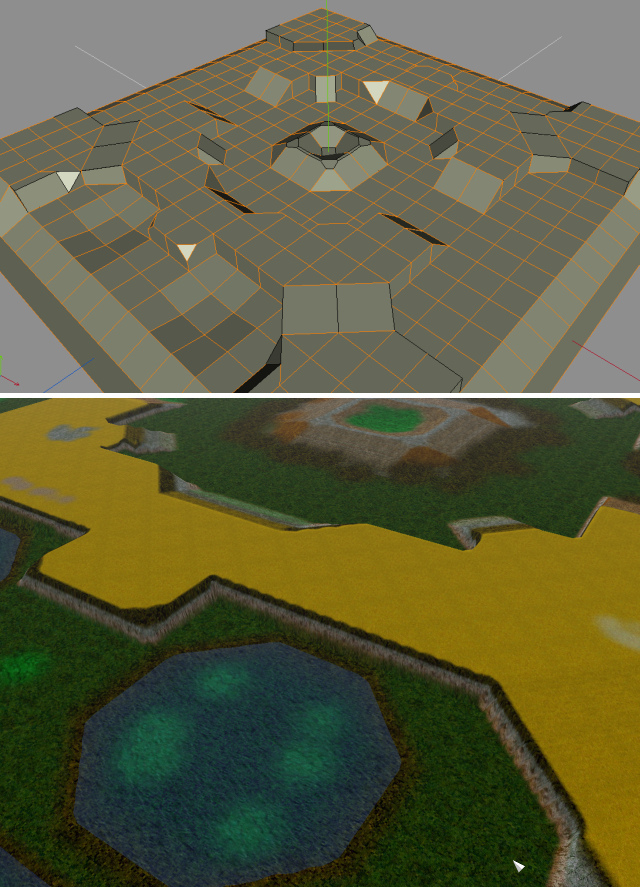
The texture needs some improvement

Now there is finally a way to edit maps in 3D, with all the usual tools of 3d modeling software: That way it is easy to make excact ramps, symmetric cliffs of same size/height etc.
Re: Sculpting and Rendering a Height Map in Blender
Posted: 12 Oct 2013, 06:31
by enetheru
knorke wrote:Great tutorial, tried it today and worked without problems in minutes.
thanks dude :) if there is anything you want me to clarify let me know.
knorke wrote:Now there is finally a way to edit maps in 3D, with all the usual tools of 3d modeling software: That way it is easy to make excact ramps, symmetric cliffs of same size/height etc.
almost exact. Only wat to be perfect is to use a mesh the same res as the map and export the vertex z locations.. But thats not anywhere near as flexible or artisticly friendly
Re: Sculpting and Rendering a Height Map in Blender
Posted: 12 Oct 2013, 20:23
by Shadowfury333
One thing to keep in mind is that because the ultimate heightmap is generated from a top-down orthographic projection, you don't have to build the map as a single mesh. You could have exact ramps by adding a plane and rotating it, for example. Only caveat is that it would require a bit of smoothing (either in post or after merging the geometry in Blender) to make sure units can traverse the connection between it and the rest of the level.
Re: Sculpting and Rendering a Height Map in Blender
Posted: 05 Dec 2013, 23:10
by knorke
because was discussed in chat:
i attached the .3ds and .blend file i used for above example.
The settings, camera etc in .blend are set up as in the tutorial. So in theory it is only nessecary to remove my heightmap model and insert your own, then render.
But no guarantees!
Re: Sculpting and Rendering a Height Map in Blender
Posted: 08 Dec 2013, 10:08
by PicassoCT
Yeah.. same method i used :)